Laser Marking Rotary: A Complete Guide to Rotary Attachments for Laser Marking
A laser marking rotary is a rotary attachment or rotary axis designed to expand the capabilities of a laser marking machine beyond flat surfaces. Instead of marking only on a stationary workpiece, a rotary device rotates cylindrical or round products while the laser creates text, logos, numbers, patterns, or other designs on the surface.
This makes rotary marking particularly useful for products such as stainless steel bottles, tumblers, rings, pipes, shafts, tools, and cylindrical machine components. For businesses that need to mark both flat and round products, adding a rotary system can significantly expand the range of applications that one laser marking machine can handle.
But a rotary attachment is not simply a motor that turns a workpiece. Different rotary designs are intended for different products, and the correct setup affects marking accuracy, focus, speed, and overall production efficiency.

Rotary shaft tooling
What Is a Laser Marking Rotary?
A laser marking rotary is a mechanical device that rotates a workpiece during laser processing.A conventional laser marking machine normally works within an X-Y marking field. The laser beam moves across a flat surface to create the desired pattern.
With a rotary attachment, the system adds rotational movement:
Laser + X/Y Movement + Rotary Rotation
The workpiece can gradually rotate while the laser marks different sections of its circumference.
For example, when marking a logo around a cylindrical stainless steel bottle, the rotary device turns the bottle while the laser processes the surface. Instead of trying to fit the entire circumference into a flat marking area, the software coordinates the laser and rotary movement to create a continuous mark.
Depending on the machine and software, rotary marking can be used for partial circumference marking or, in suitable applications, nearly 360-degree marking.
Why Do You Need a Rotary Attachment?
Laser marking machines are extremely flexible, but their standard configuration is generally optimized for relatively flat surfaces.A cylindrical surface creates several challenges.When the laser marks a flat workpiece, the distance between the laser lens and the material can remain relatively constant.On a curved surface, however, the surface position changes as the curvature increases.This can result in:
- Focus variation
- Uneven marking quality
- Distorted graphics
- Changes in marking width
- Reduced energy density away from the ideal focal position
A rotary system solves part of this problem by continuously changing the orientation of the workpiece during processing.Instead of treating a cylindrical product as a difficult flat object, the system allows the laser to process the circumference progressively.
This is why a rotary attachment can be particularly valuable when working with round products.
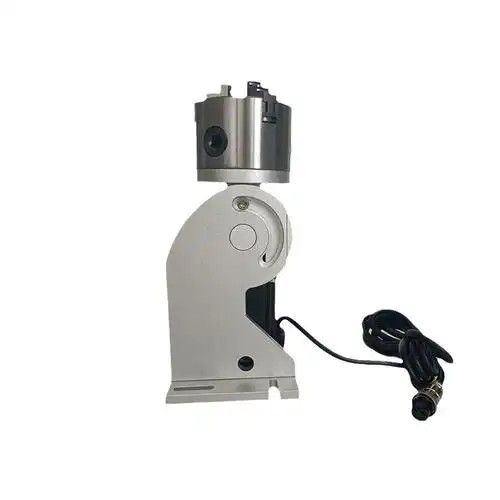
80mm rotary fixures for jewlery marking
What Can You Mark with a Laser Rotary?
One of the biggest advantages of a rotary system is the variety of cylindrical products that can be processed.
Cylindrical Metal Products
Fiber laser marking machines combined with rotary attachments are commonly suitable for:
- Stainless steel bottles
- Tumblers
- Metal cups
- Aluminum cylinders
- Metal tubes
- Shafts
- Bearings
- Machine components
These products can be marked with:
- Logos
- Serial numbers
- Text
- Patterns
- QR codes
- Data Matrix codes
- Decorative graphics
Tools and Industrial Components
A rotary attachment can also be used for cylindrical tools and components, including:
- Screwdrivers
- Cutting tools
- Drill bits
- Metal handles
- Shafts
- Cylindrical mechanical parts
For industrial applications, the purpose is often identification rather than decoration.
Manufacturers may mark:
- Part numbers
- Serial numbers
- Manufacturing information
- Traceability codes
- Brand logos
This makes rotary laser marking useful not only for customization businesses but also for industrial marking services.
Jewelry and Small Round Products
Rotary systems are also valuable for jewelry engraving.
Applications can include:
- Rings
- Bracelets
- Bangles
- Circular jewelry components
- Small cylindrical accessories
For jewelry applications, positioning accuracy becomes particularly important because the workpieces are often small and the marking details may be very fine.
A suitable rotary device can help rotate the ring or other round component accurately while the laser creates the required engraving.
Laser Marking Rotary vs. Rotary Axis
The terms rotary attachment and rotary axis are sometimes used interchangeably, but they can describe slightly different configurations.
Rotary Attachment
A rotary attachment is generally an independent device that can be installed on a laser marking machine.
For example:
Fiber Laser Marking Machine + Rotary Attachment
This is convenient for businesses that already own a laser marker but later need to process cylindrical products.The attachment can usually be removed when the machine is used for flat workpieces.
Rotary Axis
A rotary axis is more closely associated with the motion-control system of the machine.An industrial machine may be configured with:
X + Y + Rotary Axis
The rotary axis can be integrated into the machine’s control system and may use components such as:
- Stepper motors
- Servo motors
- Encoders
- Motion controllers
- PLC systems
This type of configuration is more suitable for applications requiring repeatability, automation, or integration into a larger production system.The difference is therefore not simply terminology. The appropriate configuration depends on whether you need a flexible accessory for occasional work or an integrated motion system for continuous production.
Types of Laser Marking Rotary Attachments
There is no single rotary attachment that is ideal for every application.
The most common designs include chuck-type and roller-type rotary systems.
3-Jaw Rotary Chuck
A three-jaw chuck uses three jaws to grip the workpiece around its circumference.
It is suitable for:
- Metal cylinders
- Shafts
- Rings
- Mechanical components
- Round metal parts
One advantage is relatively stable clamping.For precision applications, proper centering is important because an improperly mounted workpiece can affect the position of the marking.
4-Jaw Rotary Chuck
A four-jaw chuck provides greater flexibility because the jaws can generally be adjusted independently.This can be useful for:
- Irregular workpieces
- Special-shaped components
- Off-center parts
- Products requiring customized positioning
It is not necessarily the best choice for every application, but it can provide additional flexibility when standard cylindrical workpieces cannot be used.
Roller Rotary
A roller rotary supports the workpiece on rotating rollers rather than gripping it with a conventional chuck.This configuration is particularly useful for:
- Tumblers
- Bottles
- Cups
- Tubes
- Larger cylindrical products
The product sits on the rollers while the rollers rotate it during marking.
For businesses processing different sizes of bottles or tumblers, a roller rotary can be more convenient than a chuck system.
Ring Rotary
A specialized ring rotary is designed for small circular workpieces such as jewelry rings.
It can provide more controlled positioning for small products and is particularly useful when the marking needs to follow the circumference of the ring.
For a jewelry-focused laser engraving machine, selecting the rotary system according to the ring size and engraving position is important.
How Does Rotary Laser Marking Work?
The basic process is relatively simple, but accurate setup is essential.
Step 1: Fix the Workpiece
The product is installed on the appropriate rotary device.A chuck may grip the workpiece, while a roller system supports it from below.The goal is to make sure the product is stable and properly centered.
Step 2: Adjust the Focus
The laser must be focused correctly on the marking surface.This is especially important for curved products because the focal position changes with the geometry of the workpiece.For some applications, a suitable lens and focal length can provide a larger usable marking range.
Step 3: Set the Rotary Parameters
The marking software needs information about the rotary movement.Depending on the system, this may include:
- Workpiece diameter
- Rotary direction
- Rotation parameters
- Resolution
- Motor settings
Accurate parameter settings help synchronize the laser movement with the rotation of the workpiece.
Step 4: Prepare the Design
The operator creates or imports the marking content.This could include:
- Text
- Logo
- Serial numbers
- QR codes
- Patterns
- Decorative designs
Variable data can also be generated automatically for industrial applications.
Step 5: Start Rotary Marking
Once the parameters are confirmed, the rotary device rotates the workpiece while the laser marks the surface.
For a simple logo, only part of the circumference may be processed.
For a wraparound design, the rotary system can continue rotating the workpiece while the software coordinates the marking process.
Can You Mark 360 Degrees with a Rotary?
In suitable configurations, yes.However, 360-degree rotary marking depends on more than simply having a rotary motor.Important factors include:
- Rotary type
- Workpiece diameter
- Workpiece length
- Laser lens
- Focal distance
- Software
- Motor resolution
- Clamping method
- Required marking quality
For example, a simple text mark covering 180 degrees is generally less demanding than a detailed graphic that must align perfectly around an entire cylinder.For precision applications, the complete system should be tested with the actual workpiece before production.
Which Laser Is Best for Rotary Marking?
The rotary attachment determines how the workpiece moves, but it does not determine which laser source should be used.
The laser should first be selected according to the material.
Fiber Laser + Rotary
Fiber lasers are widely used for cylindrical metal products such as:
- Stainless steel
- Carbon steel
- Aluminum
- Brass
- Titanium
A fiber laser with a rotary attachment is a practical combination for metal bottles, tools, shafts, machine components, and many jewelry applications.
MOPA Fiber Laser + Rotary
A MOPA fiber laser can be useful when the application requires more control over pulse characteristics.It can be considered for:
- Fine metal marking
- Stainless steel color marking
- Detailed engraving
- Certain plastic applications
- Specialized jewelry applications
For businesses that want to offer more specialized marking services, a MOPA laser with a suitable rotary system can expand the range of products that can be processed.
UV Laser + Rotary
UV lasers can be used for fine marking on materials that are more sensitive to heat.Applications can include:
- Certain plastics
- Electronic components
- Specialty materials
- Small precision products
A UV laser combined with a rotary system can therefore be useful for cylindrical products where a conventional infrared fiber laser is not the ideal solution.
CO₂ Laser + Rotary
CO₂ lasers are commonly associated with non-metal materials such as:
- Wood
- Acrylic
- Leather
- Paper
- Cardboard
- Certain glass applications
With the appropriate rotary configuration, cylindrical non-metal products can also be processed.
The key principle is:
Choose the laser according to the material first, then choose the rotary system according to the shape and size of the workpiece.
How to Choose a Laser Marking Rotary
The right rotary attachment depends mainly on the products you plan to process.
Choose a Chuck Rotary If You Mainly Mark:
- Metal shafts
- Rings
- Mechanical parts
- Cylindrical components
- Small metal products
Choose a Roller Rotary If You Mainly Mark:
- Tumblers
- Bottles
- Cups
- Tubes
- Larger cylindrical products
Choose a Specialized Small Rotary If You Mainly Mark:
- Rings
- Jewelry
- Small accessories
- Precision components
Consider a Customized Rotary If You Need to Process:
- Large-diameter products
- Heavy workpieces
- Long cylinders
- Irregular shapes
- Special production fixtures
In industrial applications, the rotary system may need to be designed around the actual production process rather than selected as a standard accessory.
What Affects Rotary Marking Quality?
Buying the rotary attachment is only the first step. Several factors determine the final result.
Workpiece Alignment
If the workpiece is not properly centered, the marking position may shift during rotation.
Focal Position
Curved surfaces can make focusing more difficult than flat surfaces.
Workpiece Diameter
Different diameters require different rotary parameters and may affect the usable marking area.
Rotary Resolution
Higher positioning resolution can be important for detailed graphics and precision applications.
Laser Parameters
Power, speed, frequency, pulse width, and other parameters affect the marking result.
Software Settings
The software must correctly synchronize the laser movement with rotary movement.
For this reason, sample testing is often the best way to determine the correct combination of laser, lens, rotary system, and processing parameters.
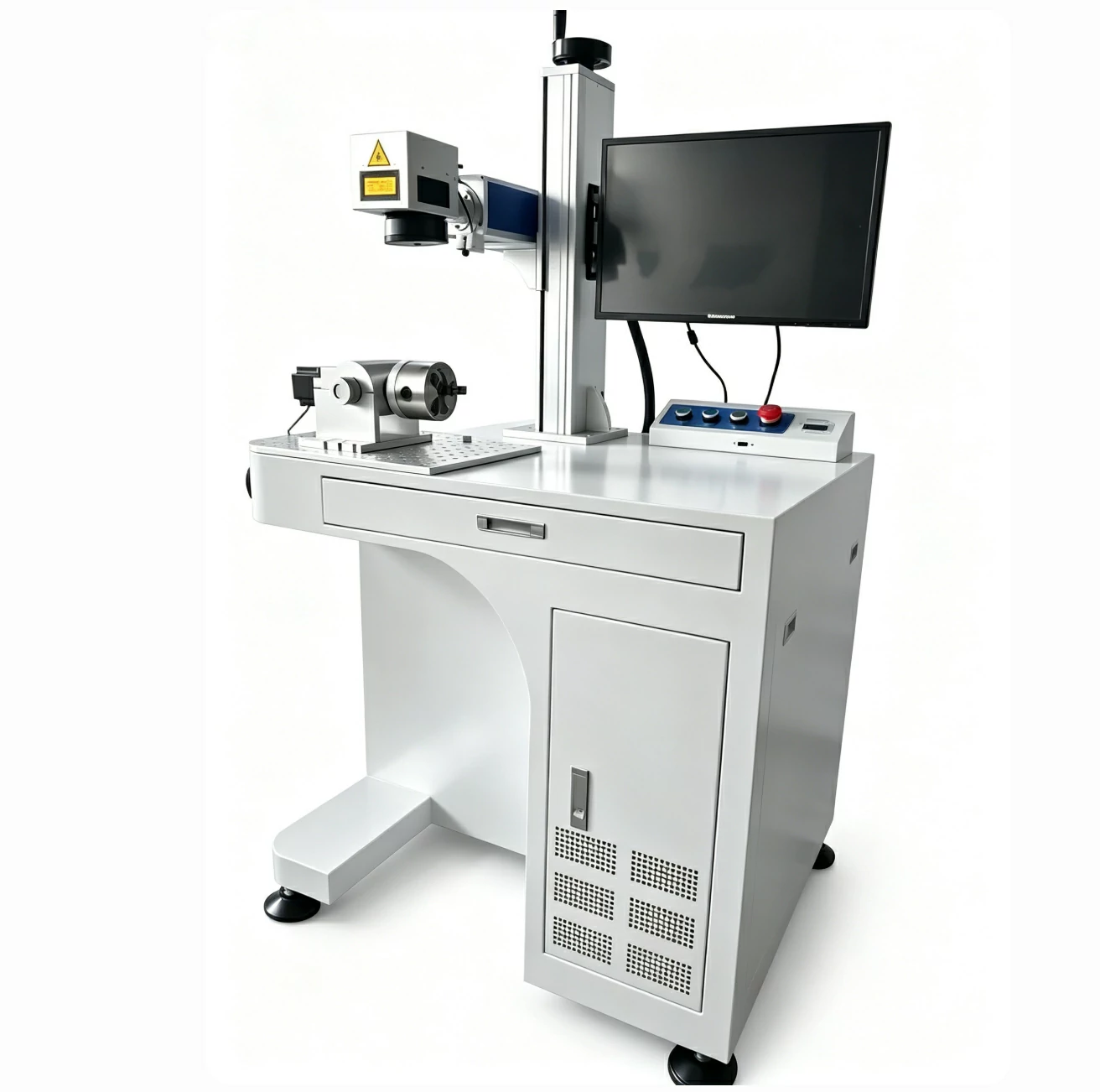
Rotary Laser Marking for Business and Production
A rotary attachment can significantly expand the applications of a laser marking machine.Without a rotary system, a machine may primarily process flat products.With the right rotary:
Flat Products → Cylindrical Products → Rings → Round Components
This creates additional opportunities for businesses.
A customization shop can offer personalized tumblers and bottles.
A jewelry business can engrave rings and bracelets.
A machine shop can mark shafts and cylindrical components.
An industrial supplier can provide serial numbers and traceability codes on round parts.
The rotary therefore should not be viewed simply as an accessory. It can become an important part of the overall marking solution.
Final Thoughts
A laser marking rotary allows a laser marking machine to move beyond flat surfaces and process cylindrical, round, and other specialized workpieces. From stainless steel tumblers and metal shafts to rings and jewelry, the right rotary system can significantly expand the range of products a laser marking machine can handle.
However, there is no universal rotary attachment for every application. A chuck rotary, roller rotary, ring rotary, and industrial rotary axis each serve different purposes. The correct choice depends on the workpiece shape, diameter, weight, material, marking area, and production requirements.
At ZS Machinery, we have helped customers solve different laser marking applications, including cylindrical products, metal components, jewelry, and customized workpieces. We can help evaluate the material, product geometry, marking requirements, and production process to recommend a suitable laser and rotary configuration.
If you have a cylindrical or round product that needs laser marking or engraving, contact ZS Machinery for a sample test and a suitable rotary laser marking solution.
Second Hand Laser Engraver: Is It Worth Buying a Used Laser Engraving Machine?