Laser Marking Paper Guide:Which type machine to choose?
Laser marking paper is a contactless process for creating text, logos, QR codes, patterns, batch numbers, and other identification marks directly on paper and paper-based materials. Unlike conventional ink printing, laser marking does not require an ink cartridge or physical contact with the substrate. However, paper is a heat-sensitive material, so achieving a clean and consistent result depends heavily on selecting the right laser wavelength, power, focus, and marking speed.
The right solution therefore depends on what type of paper you are processing, what marking effect you need, and whether you are producing individual products or running continuous packaging production.
Laser marking label paper
What Is Laser Marking on Paper?
Laser marking on paper uses a focused laser beam to locally modify the surface of a paper substrate. Depending on the material and laser parameters, the laser can produce a visible contrast through localized heating, discoloration, carbonization, or controlled ablation of the surface.
Unlike mechanical engraving, the laser does not need to touch the paper.
The basic process is:
Digital design → Laser scanning → Localized energy absorption → Surface modification → Permanent or semi-permanent mark
A laser marking system can process text, vector graphics, logos, barcodes, QR codes, and variable production data directly from a computer.
For example, a packaging manufacturer could use a laser to add:
- Product logos
- Batch numbers
- Production dates
- QR codes
- Serial numbers
- Decorative graphics
without creating a separate printing plate.
What Types of Paper Can Be Laser Marked?
1. Kraft Paper
Kraft paper is one of the most interesting materials for laser marking because it is widely used in packaging and has a natural surface appearance.Typical applications include:
- Paper bags
- Gift packaging
- Food packaging
- Product boxes
- Labels
- Handmade packaging
Laser marking can create a natural dark contrast on kraft paper without adding another layer of ink.
For premium packaging, this can produce a simple and distinctive appearance that fits the material’s natural texture.
2. Cardboard
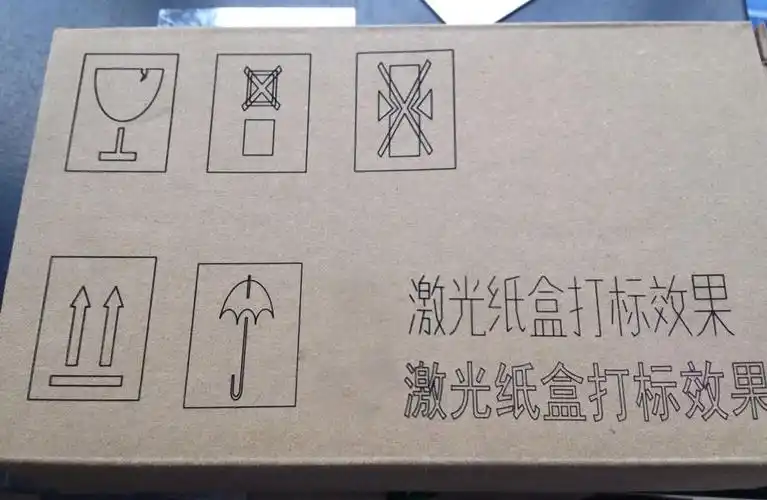
Cardboard and paperboard are commonly used for:
- Product packaging
- Shipping boxes
- Retail packaging
- Display packaging
Laser marking can be used for product identification, logos, batch information, and variable data.
However, cardboard construction varies significantly. A multilayer board may contain adhesives, coatings, or other materials that react differently to laser energy.
For production applications, the complete board structure should therefore be tested rather than judging the material only by its surface appearance.
3. Cardstock
Cardstock is commonly used for:
- Invitations
- Greeting cards
- Business cards
- Certificates
- Wedding stationery
- Creative products
Fine laser processing can create detailed text and graphics.
For premium stationery, the laser can be used to produce subtle contrast or decorative effects without requiring conventional printing plates.
Laser Marking On Cardboard
4. Coated Paper
Coated paper requires more attention.
Its surface may contain:
- Polymer coatings
- Gloss coatings
- Pigments
- Protective layers
Depending on the coating composition, laser processing can result in:
- Color changes
- Surface ablation
- Melting
- Localized discoloration
- Smoke generation
For this reason, coated paper is one of the situations where laser wavelength selection and sample testing become particularly important.
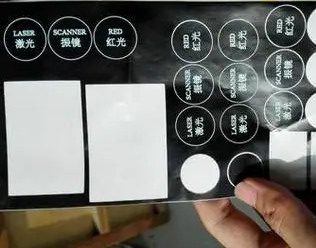
5. Paper Labels
Paper labels are another useful application.
A laser can add:
- Serial numbers
- Batch codes
- QR codes
- Product identification
- Variable information
This is particularly useful for short production runs or customized products where conventional pre-printed labels would require additional preparation.
Which Laser Is Best for Paper?
There is no single laser that is best for every type of paper.
For ordinary paper and cardboard, CO₂ laser systems are generally one of the most suitable choices because organic materials such as paper interact effectively with the CO₂ laser wavelength.
UV lasers can be valuable when very fine marking or controlled processing of specialty and coated surfaces is required.
Fiber lasers, meanwhile, are primarily designed for metals and are generally not the first choice for ordinary uncoated paper.
CO₂ Laser for Paper Marking
CO₂ lasers operate at approximately 10.6 μm and are widely used for processing organic materials.
Common applications include:
- Paper
- Cardboard
- Kraft paper
- Wood
- Leather
- Acrylic
- Certain plastics
For paper processing, CO₂ lasers can be used for both marking and cutting.
Why CO₂ works well with paper
Paper is composed primarily of organic materials. The CO₂ laser wavelength can be strongly absorbed by these materials, allowing the laser to produce localized heating and surface modification.
Depending on the parameters, the result can range from a subtle color change to a more pronounced dark engraving effect.
For businesses mainly processing paper products, packaging, cardboard, or kraft paper, a CO₂ laser is often the most practical starting point.
UV Laser for Fine Paper Marking
UV lasers operate at a much shorter wavelength than infrared fiber and CO₂ lasers.
Their shorter wavelength can provide advantages when working with:
- Fine graphics
- Specialty paper
- Coated surfaces
- Sensitive materials
- High-resolution applications
UV laser processing can provide a smaller and more controlled interaction zone in suitable applications.This makes UV particularly interesting for premium packaging, fine graphics, and applications where excessive thermal damage must be minimized.
However, UV systems are usually more expensive than basic CO₂ systems, so the additional investment should be justified by the required marking quality and material characteristics.
Can a Fiber Laser Mark Paper?
In general, fiber lasers are designed primarily for metal processing, rather than ordinary paper.A standard fiber laser marking machine is ideal for materials such as:
- Stainless steel
- Aluminum
- Brass
- Copper
- Titanium
- Carbon steel
Ordinary paper does not absorb the 1064 nm fiber laser wavelength in the same way as metals.
There are exceptions.
Some paper products may contain:
- Metalized layers
- Special pigments
- Laser-sensitive coatings
In these cases, a fiber laser may interact with the treated surface.
Therefore, if the main application is ordinary paper, kraft paper, or cardboard, a CO₂ laser is normally the more logical choice. If the same production line also processes metal products, a fiber laser may be considered as part of a multi-material solution.
Laser Marking vs. Laser Engraving on Paper
The terms laser marking and laser engraving are sometimes used interchangeably, but they do not necessarily describe the same process.
Laser Marking
Laser marking generally focuses on changing the appearance of the surface.
Examples:
- Logo
- Text
- QR code
- Serial number
- Batch code
The goal is usually high contrast with minimal material removal.
Laser Engraving
Laser engraving involves removing or significantly modifying material to create a physical recess.
For paper, engraving is usually much shallower than engraving metal because paper is thin and highly heat-sensitive.
Applications may include:
- Decorative patterns
- Artistic designs
- Emboss-like visual effects
- Packaging details
For most paper identification applications, laser marking is more appropriate than deep engraving.
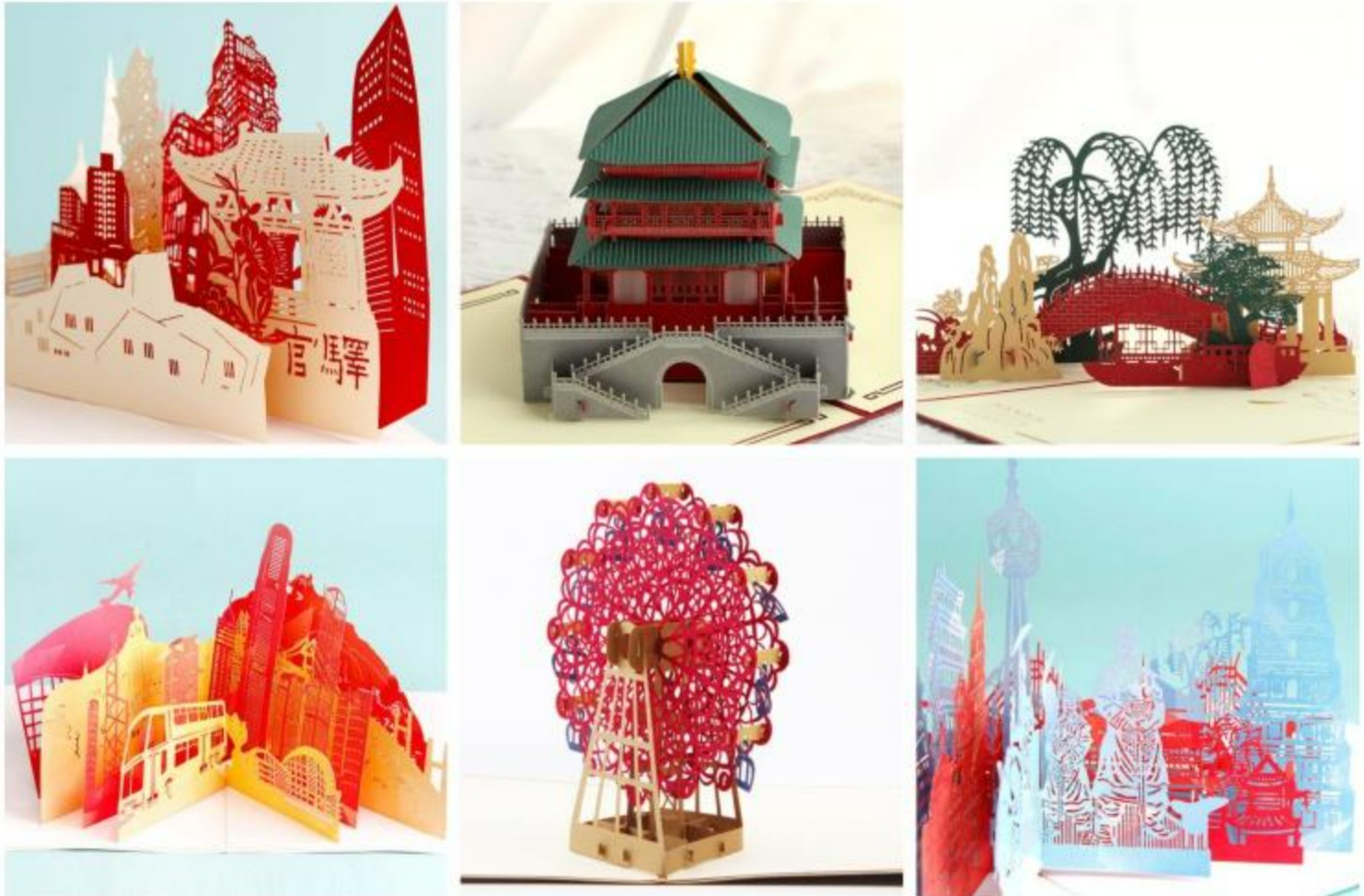
Laser Engraving Paper Products
Laser Marking vs. Laser Cutting Paper
Laser marking and laser cutting are also two different processes.
Laser Marking
The laser changes the surface without completely separating the material.
Typical applications:
- Text
- Logos
- QR codes
- Product information
Laser Cutting
The laser passes through the material and separates it.
Typical applications:
- Packaging templates
- Paper shapes
- Decorative cutouts
- Invitations
- Labels
A CO₂ laser system can often perform both functions, but the operating parameters are very different.
For marking, the objective is controlled surface interaction.
For cutting, sufficient energy must be delivered to penetrate the entire thickness.
How to Laser Mark Paper
Achieving a clean mark on paper requires considerably more parameter control than simply increasing laser power.
Step 1: Identify the Paper
Before testing, determine:
- Paper type
- Thickness
- Color
- Coating
- Surface finish
If possible, obtain the exact production material rather than using a similar sample.
Step 2: Select the Appropriate Laser
For ordinary paper:
CO₂ laser is generally the first option.
For fine or specialty coated materials:
UV laser may be worth evaluating.
For metalized or specially coated materials:
Fiber laser may be possible depending on the coating.
Step 3: Set the Focus Correctly
Focus has a major influence on marking quality.
A correctly focused beam provides:
- Smaller effective spot
- Sharper graphics
- Better edge definition
- More consistent marking
If the beam is not properly focused, the mark can become wider and less precise.
Step 4: Start With Low Energy
Paper is highly sensitive to heat.
A common mistake is starting with excessive power.
Instead, begin with relatively low energy and gradually increase the laser effect until the desired contrast is achieved.
The goal is:
Maximum contrast with minimum thermal damage.
Step 5: Adjust Marking Speed
Marking speed determines how long the laser interacts with each area.
If the speed is too slow:
- Paper can become excessively dark
- Edges may burn
- Heat can spread
- The substrate may deform
If the speed is too fast:
- Contrast may be insufficient
- The marking may become difficult to read
A parameter test matrix is therefore much more useful than relying on one fixed setting.
Step 6: Test Line Spacing and Filling
For filled graphics and large logos, line spacing affects both appearance and heat accumulation.
If the lines are too close:
- More energy accumulates
- The surface can become excessively dark
- Edges can become rough
If the spacing is too large:
- The filled area may appear uneven
Small text and large graphics may require different parameter sets.
What Affects Laser Marking Quality on Paper?
Laser Power
Higher power increases available energy, but that does not automatically mean better marking.
Excessive power can produce:
- Charring
- Smoke
- Burn-through
- Oversized marks
Marking Speed
Speed is one of the most important parameters.
A slower speed generally increases energy delivered to a specific area.
For paper, this can quickly move the process from clean marking to burning.
Focus
Focus affects the effective spot size and therefore:
- Resolution
- Line width
- Edge sharpness
Frequency and Pulse Characteristics
For pulsed laser systems, frequency and pulse characteristics influence how energy is delivered to the material.
The optimum settings depend on the specific laser source and paper composition.
Paper Thickness
Thin paper generally requires less energy than thick paperboard.
However, thickness alone does not determine laser behavior.
A heavily coated thin paper can behave differently from a thick uncoated kraft paper.
Surface Coating
This is often overlooked.
A coating can completely change how the laser interacts with the material.
Two papers that look almost identical to the eye may require completely different laser parameters.
Laser Marking Paper for Packaging
Packaging is one of the most commercially interesting applications for paper laser marking.Modern packaging manufacturers increasingly need flexible production methods for:
- Small batches
- Customized products
- Variable information
- Product traceability
A laser marking system can add information directly to the packaging without requiring a new printing plate for every design.
Product Logos
Brands can apply:
- Company logos
- Product names
- Decorative graphics
directly to paper packaging.
QR Codes
QR codes are becoming increasingly important in packaging.
They can be used for:
- Product information
- Marketing campaigns
- Authentication
- Digital instructions
- Traceability
Laser marking can create machine-readable codes directly on suitable paper surfaces.
Batch and Production Information
Manufacturers can mark:
- Batch numbers
- Production dates
- Product codes
- Serial numbers
This is especially useful when the information changes from one production batch to another.
Variable Data Laser Marking
One major advantage of digital laser marking is the ability to change the content without physically changing a printing plate.
For example:
Package A:
SN00001
Package B:
SN00002
Package C:
SN00003
The laser system can receive different data automatically from production software or a database.
This makes laser marking attractive for:
- Product traceability
- Anti-counterfeiting
- Personalized packaging
- Serialized products
Laser Marking Paper vs. Traditional Printing
Laser marking does not necessarily replace traditional printing. Instead, the two technologies have different strengths.
| Feature | Laser Marking | Traditional Ink Printing |
|---|---|---|
| Ink | Not required | Required |
| Physical Contact | Non-contact | Depends on process |
| Variable Data | Excellent | Available with suitable systems |
| Small Batches | Excellent | May require setup |
| Consumables | Very low | Ink and other consumables |
| Maintenance | Generally low | Depends on printer |
| Permanent Effect | Material dependent | Ink dependent |
| Fine Customization | Excellent | Excellent |
For very high-volume conventional packaging, traditional printing may remain more economical.
For short-run, customized, serialized, or variable-data applications, laser marking can provide significant advantages.
How to Choose a Laser Marking Machine for Paper
The best machine depends on your material and production requirements.
Choose a CO₂ Laser If:
Your main materials are:
- Paper
- Cardboard
- Kraft paper
- Wood
- Leather
and you need:
- Marking
- Cutting
- Engraving
A CO₂ laser is generally the most versatile choice.
Consider a UV Laser If:
You need:
- Fine surface marking
- High-resolution graphics
- Specialty material processing
- More controlled thermal interaction
UV is particularly worth considering for premium packaging and specialty coated materials.
Consider a Fiber Laser If:
Your main application is actually metal marking and you occasionally need to process special paper products with metalized or laser-sensitive surfaces.
For ordinary paper alone, a fiber laser would generally not be the first machine we recommend.
Can Laser Marking Replace Paper Printing?
Not in every application.Traditional printing remains highly effective for:
- Very large production volumes
- Full-color graphics
- Large-area printing
- Standardized packaging
Laser marking is particularly valuable when manufacturers need:
- Variable information
- Personalization
- Small batches
- Product traceability
- Permanent identification
- Reduced dependence on consumables
For applications requiring full-color images, conventional or digital printing remains more suitable.
The most effective production solution may also combine printing and laser marking, allowing each technology to perform the task it handles best.
Safety Considerations When Laser Marking Paper
Paper is combustible, so safety is especially important.
A laser marking system should be operated with appropriate:
- Fume extraction
- Fire protection
- Material testing
- Laser safety controls
Operators should never leave a paper-processing laser unattended during operation.
The exact safety configuration depends on the laser class, machine structure, enclosure, production environment, and local regulations.
For continuous production, an enclosed system with suitable extraction and safety interlocks is generally preferable to an open workstation.
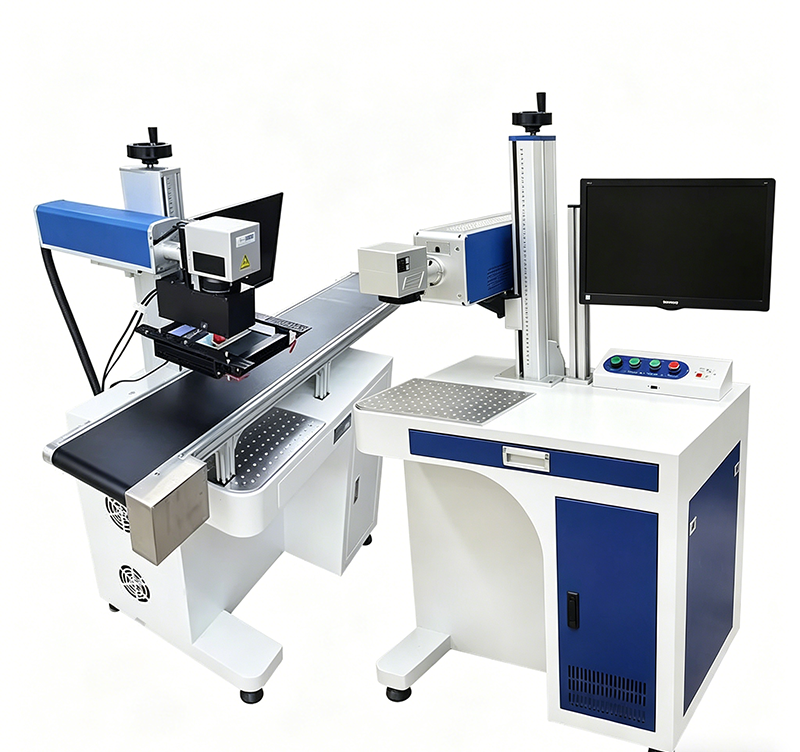
CO2 Laser Marking Machines
Frequently Asked Questions
Can you laser mark paper?
Yes. Paper, cardboard, kraft paper, and many other paper-based materials can be laser marked. The appropriate laser and parameters depend on the material composition and desired effect.
What laser is best for paper?
For ordinary paper, cardboard, and kraft paper, a CO₂ laser is generally the most suitable choice. UV lasers can be considered for fine or specialty applications.
Can a fiber laser mark paper?
A standard fiber laser is primarily designed for metals and is generally not the first choice for ordinary paper. Special coatings or metalized paper can behave differently and should be tested.
Can you laser engrave cardboard?
Yes. A CO₂ laser can engrave and cut many types of cardboard. Processing parameters should be adjusted according to thickness and composition.
Can a CO₂ laser mark kraft paper?
Yes. Kraft paper is one of the common organic materials processed with CO₂ lasers.
What power laser is needed to mark paper?
There is no universal power setting. Paper is sensitive to heat, so the required power depends on the laser type, marking speed, focus, paper thickness, coating, and desired contrast.
Can laser marking create QR codes on paper?
Yes. A laser can create QR codes on suitable paper surfaces, provided the resulting contrast and resolution are sufficient for reliable scanning.
Does laser marking paper cause burning?
It can if excessive energy is applied. Proper selection of laser power, speed, focus, and other parameters is essential to create a clean mark without excessive charring or thermal damage.
Final Thoughts
Choosing the right laser for laser marking paper depends on the paper material, coating, marking effect, and production requirements. At ZS Machinery, we have helped many customers solve similar paper and packaging marking challenges, from selecting the appropriate laser source to testing marking parameters for different paper materials.
For paper, cardboard, kraft paper, and specialty packaging materials, we can evaluate the material and recommend a suitable laser solution based on the required marking quality and production process.
If you have a paper or packaging material that needs laser marking, send us a sample or application requirement. Our team can help test the material and find a practical laser marking solution for your application.
Laser Marking Business: Market Trends, Business Opportunities and Future Technology